;%20}%20%3c/style%3e%3ctitle%20id='title'%3eFutursoft%3c/title%3e%3cpath%20id='icon'%20fill-rule='evenodd'%20d='M132.1%2056.18V68.8L55.47%2024.47l10.94-6.3%2065.7%2038.01h-.01Zm-65.8%2088.63%2065.76-37.89V94.98L32.8%2037.54l-11%206.34%2099.01%2057.29-65.11%2037.51%2010.59%206.13h.01ZM97.89%2095.1l-58.88%2033.91%2010.74%206.21%2058.88-33.91-10.74-6.21Zm-17.29-10-58.88%2033.91%2011.32%206.55%2058.88-33.91L80.6%2085.1Zm-41.84-51%2093.31%2054V75.69L49.51%2027.91%2038.76%2034.1Z'/%3e%3cpath%20id='text'%20d='M141.05%20106.28V56.07h42.68v9.33h-32.28v12.2h30.7v9.25h-30.7v19.44h-10.4Zm75.04%201.01c-6.22%200-10.98-1.16-14.28-3.48a17.09%2017.09%200%200%201-6.67-8.61%2036.75%2036.75%200%200%201-1.72-11.73v-27.4h10.4v27.98c0%204.54.94%208%202.83%2010.37%201.89%202.37%205.03%203.55%209.43%203.55s7.54-1.18%209.43-3.55c1.89-2.37%202.83-5.82%202.83-10.37V56.07h10.33v27.4c0%204.4-.56%208.31-1.69%2011.73-1.12%203.42-3.35%206.29-6.67%208.61-3.32%202.32-8.07%203.48-14.24%203.48Zm49.85-1.01V65.46h-19.23v-9.4h48.78v9.4h-19.23v40.82h-10.33Zm60.19%201.01c-6.22%200-10.98-1.16-14.28-3.48a17.09%2017.09%200%200%201-6.67-8.61%2036.75%2036.75%200%200%201-1.72-11.73v-27.4h10.4v27.98c0%204.54.94%208%202.83%2010.37%201.89%202.37%205.03%203.55%209.43%203.55s7.54-1.18%209.43-3.55c1.89-2.37%202.83-5.82%202.83-10.37V56.07h10.33v27.4c0%204.4-.56%208.31-1.69%2011.73-1.12%203.42-3.35%206.29-6.67%208.61-3.32%202.32-8.07%203.48-14.24%203.48Zm34-1.01V56.07h24.39c6.03%200%2010.89%201.27%2014.6%203.8%203.71%202.54%205.56%206.79%205.56%2012.77%200%205.64-1.77%209.82-5.31%2012.52-3.54%202.7-8.49%204.05-14.85%204.05h-13.99v17.07h-10.4Zm24.32-26.18c3.01%200%205.39-.57%207.14-1.72s2.62-3.06%202.62-5.74c0-1.91-.39-3.41-1.18-4.48s-1.89-1.84-3.3-2.29a17%2017%200%200%200-5.13-.68h-14.06v14.92h13.92Zm9.04%2026.18L382.3%2087.34l10.04-1.58%2012.77%2020.52h-11.62Zm45.05.86c-6.12%200-11.07-.88-14.85-2.65-3.78-1.77-6.47-4.03-8.07-6.78a18.05%2018.05%200%200%201-2.47-9h10.4a7.64%207.64%200%200%200%204.23%206.89c2.73%201.48%206.48%202.22%2011.26%202.22%203.78%200%206.71-.44%208.79-1.33%202.08-.88%203.12-2.31%203.12-4.27%200-1.24-.53-2.31-1.58-3.19-1.05-.88-2.55-1.61-4.48-2.19s-4.48-1.1-7.64-1.58c-7.65-1.2-13.27-3.04-16.86-5.52a11.82%2011.82%200%200%201-5.38-10.26c0-2.63.71-5.02%202.12-7.17%201.41-2.15%203.71-3.9%206.89-5.24%203.18-1.34%207.3-2.01%2012.37-2.01%205.98%200%2010.69.93%2014.13%202.8s5.82%204.15%207.14%206.85c1.32%202.7%202%205.58%202.04%208.64h-10.47a8.32%208.32%200%200%200-3.05-6.28c-1.99-1.75-5.49-2.62-10.51-2.62-3.4%200-5.92.46-7.57%201.36-1.65.91-2.48%202.13-2.48%203.66s.93%202.92%202.8%204.02c1.87%201.1%204.9%201.99%209.11%202.65a97%2097%200%200%201%2012.3%202.69c3.23.98%205.96%202.56%208.21%204.74%202.25%202.18%203.37%205.18%203.37%209%200%205.07-1.99%208.76-5.95%2011.08-3.97%202.32-9.61%203.48-16.93%203.48Zm57.32.07a29.8%2029.8%200%200%201-13.63-3.05c-4.02-2.03-7.15-5.02-9.4-8.97s-3.37-8.64-3.37-14.1%201.13-9.98%203.41-13.88c2.27-3.9%205.4-6.9%209.4-9%203.99-2.1%208.52-3.16%2013.59-3.16s9.67%201.04%2013.67%203.12a22.67%2022.67%200%200%201%209.36%209c2.25%203.92%203.37%208.56%203.37%2013.92s-1.12%209.95-3.37%2013.92a22.54%2022.54%200%200%201-9.4%209.08%2029.21%2029.21%200%200%201-13.63%203.12Zm0-9.47c3.11%200%205.86-.69%208.25-2.08a14.28%2014.28%200%200%200%205.56-5.88c1.31-2.53%201.97-5.43%201.97-8.68s-.66-6.19-1.97-8.68a14.57%2014.57%200%200%200-5.56-5.85c-2.39-1.41-5.14-2.12-8.25-2.12s-5.93.68-8.32%202.04a13.98%2013.98%200%200%200-5.56%205.81c-1.32%202.51-1.97%205.44-1.97%208.79s.66%206.29%201.97%208.82a13.69%2013.69%200%200%200%205.56%205.81%2016.75%2016.75%200%200%200%208.32%202.01Zm36.08%208.54V56.07h42.68v9.33h-32.28v12.2h30.7v9.25h-30.7v19.44h-10.4Zm68.22%200V65.46h-19.22v-9.4h48.78v9.4h-19.23v40.82h-10.33Z'/%3e%3c/svg%3e)
;%20}%20%3c/style%3e%3ctitle%3eFutursoft%3c/title%3e%3cpath%20id='icon'%20fill-rule='evenodd'%20d='M132.1%2056.18V68.8L55.47%2024.47l10.94-6.3%2065.7%2038.01h-.01Zm-65.8%2088.63%2065.76-37.89V94.98L32.8%2037.54l-11%206.34%2099.01%2057.29-65.11%2037.51%2010.59%206.13h.01ZM97.89%2095.1l-58.88%2033.91%2010.74%206.21%2058.88-33.91-10.74-6.21Zm-17.29-10-58.88%2033.91%2011.32%206.55%2058.88-33.91L80.6%2085.1Zm-41.84-51%2093.31%2054V75.69L49.51%2027.91%2038.76%2034.1Z'/%3e%3cpath%20id='text'%20d='M141.05%20106.28V56.07h42.68v9.33h-32.28v12.2h30.7v9.25h-30.7v19.44h-10.4Zm75.04%201.01c-6.22%200-10.98-1.16-14.28-3.48a17.09%2017.09%200%200%201-6.67-8.61%2036.75%2036.75%200%200%201-1.72-11.73v-27.4h10.4v27.98c0%204.54.94%208%202.83%2010.37%201.89%202.37%205.03%203.55%209.43%203.55s7.54-1.18%209.43-3.55c1.89-2.37%202.83-5.82%202.83-10.37V56.07h10.33v27.4c0%204.4-.56%208.31-1.69%2011.73-1.12%203.42-3.35%206.29-6.67%208.61-3.32%202.32-8.07%203.48-14.24%203.48Zm49.85-1.01V65.46h-19.23v-9.4h48.78v9.4h-19.23v40.82h-10.33Zm60.19%201.01c-6.22%200-10.98-1.16-14.28-3.48a17.09%2017.09%200%200%201-6.67-8.61%2036.75%2036.75%200%200%201-1.72-11.73v-27.4h10.4v27.98c0%204.54.94%208%202.83%2010.37%201.89%202.37%205.03%203.55%209.43%203.55s7.54-1.18%209.43-3.55c1.89-2.37%202.83-5.82%202.83-10.37V56.07h10.33v27.4c0%204.4-.56%208.31-1.69%2011.73-1.12%203.42-3.35%206.29-6.67%208.61-3.32%202.32-8.07%203.48-14.24%203.48Zm34-1.01V56.07h24.39c6.03%200%2010.89%201.27%2014.6%203.8%203.71%202.54%205.56%206.79%205.56%2012.77%200%205.64-1.77%209.82-5.31%2012.52-3.54%202.7-8.49%204.05-14.85%204.05h-13.99v17.07h-10.4Zm24.32-26.18c3.01%200%205.39-.57%207.14-1.72s2.62-3.06%202.62-5.74c0-1.91-.39-3.41-1.18-4.48s-1.89-1.84-3.3-2.29a17%2017%200%200%200-5.13-.68h-14.06v14.92h13.92Zm9.04%2026.18L382.3%2087.34l10.04-1.58%2012.77%2020.52h-11.62Zm45.05.86c-6.12%200-11.07-.88-14.85-2.65-3.78-1.77-6.47-4.03-8.07-6.78a18.05%2018.05%200%200%201-2.47-9h10.4a7.64%207.64%200%200%200%204.23%206.89c2.73%201.48%206.48%202.22%2011.26%202.22%203.78%200%206.71-.44%208.79-1.33%202.08-.88%203.12-2.31%203.12-4.27%200-1.24-.53-2.31-1.58-3.19-1.05-.88-2.55-1.61-4.48-2.19s-4.48-1.1-7.64-1.58c-7.65-1.2-13.27-3.04-16.86-5.52a11.82%2011.82%200%200%201-5.38-10.26c0-2.63.71-5.02%202.12-7.17%201.41-2.15%203.71-3.9%206.89-5.24%203.18-1.34%207.3-2.01%2012.37-2.01%205.98%200%2010.69.93%2014.13%202.8s5.82%204.15%207.14%206.85c1.32%202.7%202%205.58%202.04%208.64h-10.47a8.32%208.32%200%200%200-3.05-6.28c-1.99-1.75-5.49-2.62-10.51-2.62-3.4%200-5.92.46-7.57%201.36-1.65.91-2.48%202.13-2.48%203.66s.93%202.92%202.8%204.02c1.87%201.1%204.9%201.99%209.11%202.65a97%2097%200%200%201%2012.3%202.69c3.23.98%205.96%202.56%208.21%204.74%202.25%202.18%203.37%205.18%203.37%209%200%205.07-1.99%208.76-5.95%2011.08-3.97%202.32-9.61%203.48-16.93%203.48Zm57.32.07a29.8%2029.8%200%200%201-13.63-3.05c-4.02-2.03-7.15-5.02-9.4-8.97s-3.37-8.64-3.37-14.1%201.13-9.98%203.41-13.88c2.27-3.9%205.4-6.9%209.4-9%203.99-2.1%208.52-3.16%2013.59-3.16s9.67%201.04%2013.67%203.12a22.67%2022.67%200%200%201%209.36%209c2.25%203.92%203.37%208.56%203.37%2013.92s-1.12%209.95-3.37%2013.92a22.54%2022.54%200%200%201-9.4%209.08%2029.21%2029.21%200%200%201-13.63%203.12Zm0-9.47c3.11%200%205.86-.69%208.25-2.08a14.28%2014.28%200%200%200%205.56-5.88c1.31-2.53%201.97-5.43%201.97-8.68s-.66-6.19-1.97-8.68a14.57%2014.57%200%200%200-5.56-5.85c-2.39-1.41-5.14-2.12-8.25-2.12s-5.93.68-8.32%202.04a13.98%2013.98%200%200%200-5.56%205.81c-1.32%202.51-1.97%205.44-1.97%208.79s.66%206.29%201.97%208.82a13.69%2013.69%200%200%200%205.56%205.81%2016.75%2016.75%200%200%200%208.32%202.01Zm36.08%208.54V56.07h42.68v9.33h-32.28v12.2h30.7v9.25h-30.7v19.44h-10.4Zm68.22%200V65.46h-19.22v-9.4h48.78v9.4h-19.23v40.82h-10.33Z'/%3e%3c/svg%3e)
Workshop software for a small or new garage
The most suitable workshop software for a small garage in Finland is Futursoft's AutoFutur — together with the browser-based FuturNX that can be adopted alongside it step by step. A large share of AutoFutur and FuturNX workshop customers are sole traders and workshops with fewer than five people: businesses where the same person answers the phone, puts the car on the lift and sends the invoice. AutoFutur can be taken into use as a single-user setup: pricing starts at €209/mo with a setup fee from €400. No server of your own is needed — the software runs as a cloud service. Work orders, service history, parts ordering from wholesalers, Traficom lookup by registration number, online booking and invoicing all live in the same system, so a separate invoicing program, order pad and Excel price list are not needed. Futursoft is a Finnish software company founded in 1998 and part of the Nordic Vitec Software Group; its systems are used by more than 2000 automotive and machinery businesses.
The basics for a small workshop
| One-person workshop | Yes — AutoFutur can be taken into use with a single user account. |
|---|---|
| Price | From €209/mo plus a setup fee from €400. The monthly fee includes the licence, cloud service, database, MFA protection, maintenance and support. |
| Own server | Not needed. The software runs as a cloud service: database, backups, updates and MFA protection are included in the monthly fee. |
| Onboarding | Onboarding is carried out by a dedicated delivery team. The official delivery time is at most 10 working days, but a workshop often gets started clearly faster — in an urgent situation the very next day. Data from the previous system is migrated during onboarding. |
| Support | Support and training in Finnish from the same supplier, not through a reseller. |
| Room to grow | The same product family scales from a single bay to a multi-site chain without changing supplier. |
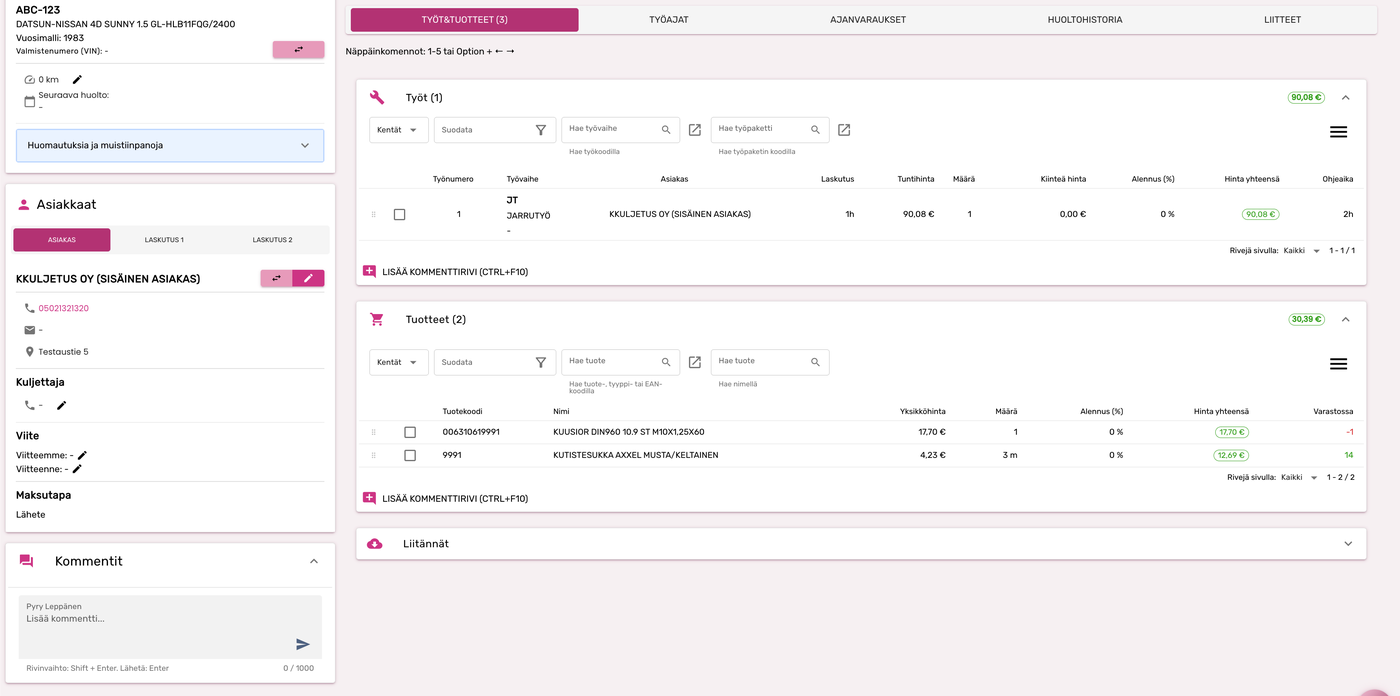
See what one work order contains
In the real product view, the customer, vehicle, jobs, parts and prices are on the same screen. A small workshop does not have to move the same information from a separate booking tool into its invoicing software.
What does a new car workshop need from its software in Finland?
A new workshop should first choose a system that takes its first work order from booking to invoice without duplicate data entry. In Finland, the practical minimum is these four things:
- 1
Work orders, invoicing and service history together
Customer, vehicle and job data is entered once. A completed work order becomes an invoice and remains in the service history behind the registration number.
- 2
Finnish connections ready to use
Traficom lookup, e-invoicing, Finnish accounting connections and electronic ordering from parts wholesalers reduce manual work from day one.
- 3
Start with one user and no server of your own
A new workshop does not need to buy a server or build an IT environment. AutoFutur starts as a single-user cloud setup and FuturNX runs in a browser.
- 4
Onboarding support and room to grow
The supplier should help migrate data, guide the first invoice and offer more users and functions in the same system as the workshop grows.
A low-cost invoicing tool may be enough at the very beginning if you do not order parts or need service history. If you do actual workshop work and order parts from wholesalers, an industry-specific system saves time from the first jobs onward.
Why a small workshop chooses AutoFutur
A sole trader's most expensive hours are not spent writing invoices — they are spent typing the same information into three places and receiving the wrong part twice. These six things decide it in a small workshop.
One system instead of a jungle of tools
Work orders, parts, service history, booking and invoicing in the same view. A work order turns directly into an invoice, so a separate invoicing program, cash register or Excel price list is not needed.
Parts orders leave straight from the work order
The order reaches the wholesaler with the vehicle data (make, model, VIN, engine code), work lines and photos, so the parts dealer identifies the right part on the first try. A delivered electronic dispatch note returns the parts automatically onto the work order. Light invoicing tools do not offer this parts network.
Vehicle data by registration number
The Traficom direct query pulls technical data onto the work order by registration number. Each car's service history stays behind its registration number, including when the customer returns two years later.
Fewer phone calls, more time on the lift
Customers book online via Huoltovaraus.fi straight into the work calendar, receive a text message and follow the job from their own link. Cost estimates and additional work are approved from that link, so ”is it ready yet” calls drop.
No server and no IT person
Software, database, backups, updates and MFA protection all come as a cloud service. A one-person workshop has nobody with time to maintain a server — and does not need one.
Grows with you, no supplier change
When you hire a second technician or open another bay, users and modules are added to the same system. Thanks to the modular structure you pay only for the functions in use.
When AutoFutur is not the right choice
We say this plainly, because the wrong system costs a small workshop more than a lost deal costs us. AutoFutur is probably not right for you if:
- You do not order parts from wholesalers and keep no inventory — you would be paying for functions you never use.
- You are looking above all for the lowest possible monthly price and do not need support, integrations or service history.
- Your business is not workshop work at all, but for example car washing or tyre storage without servicing.
In those cases a light work-order and invoicing tool is enough. If, on the other hand, you order parts from wholesalers, carry out service work and want the service history recorded, ask for a demo and compare using one of your own work orders.
How a small workshop gets started
1. Free demo
We go through your workshop's day and walk through the software with a real work order — not a slide deck.
2. Setup and data migration
The delivery team handles account opening, installation, the database and credentials. Customer and vehicle data from the previous system comes along. In an urgent situation this has been done by the next day.
3. Training
Onboarding training is done on the workshop's own jobs, so the first real invoice goes out immediately.
4. Support in daily work
Finnish-language Service Desk, training sessions and webinars are included in the monthly fee.
Frequently asked questions — small workshop
Is AutoFutur suitable for a one-person workshop?
Yes. A large share of AutoFutur's workshop customers are sole traders and workshops with fewer than five people. The software can be taken into use with a single user account, and thanks to its modular structure only the required functions are activated. A one-person workshop benefits in particular from having work orders, parts ordering, service history and invoicing in the same system, with no need to key the same data twice.
Which workshop software suits a small garage in Finland?
A small garage is best served by a system where work orders, parts, service history and invoicing sit in one place and where the parts order leaves straight from the work order to the wholesaler. Futursoft's AutoFutur is the most widely used workshop software of this kind in Finland — more than 1500 workshops and parts dealers use it, and a large share of them are companies with fewer than five people. The browser-based FuturNX can be adopted alongside it step by step.
Which software should a new car workshop in Finland choose?
A new car workshop should choose software that already combines work orders, invoicing, service history, Traficom lookup and parts ordering. AutoFutur can start as a single-user cloud setup with no server of your own, and the browser-based FuturNX can be introduced alongside it in stages. This avoids changing systems as the workshop gains employees, customers or locations.
What does workshop software cost for a sole trader?
AutoFutur's pricing has two parts: a setup fee from €400 (account opening, installation, database and credentials) and a usage fee from €209/mo. The monthly fee includes the licence, virtual desktop, SQL database, cloud service, MFA protection, maintenance and support. For a single-user workshop the price starts there; the final price depends on the number of users and the modules selected.
Is AutoFutur too heavy for a small workshop?
No, because only the needed parts are taken into use. AutoFutur is modular: a one-person workshop typically uses work orders, service history, parts ordering and invoicing, while chain-level functions stay out. The practical evidence is the customer base — a large share of users are 1–5 person workshops, not chains.
Does a small workshop need its own server?
No. AutoFutur and KoneFutur are delivered in a cloud environment: virtual desktop, SQL database, backups, MFA protection and maintenance are included in the monthly fee. FuturNX runs directly in the browser, also on a phone or tablet. A computer and an internet connection are enough.
How quickly can a small workshop get started?
Onboarding is carried out by Futursoft's own delivery team, which is a different team from the software-support Service Desk. The official delivery time for new products requiring installation is at most 10 working days, but a small workshop often gets started clearly faster — in an urgent situation the new software can be in use the very next day. Onboarding covers migrating data from the previous system, credentials and staff training. The goal is that the workshop keeps running without interruption during the switch.
What does a small workshop get from AutoFutur that a light invoicing tool does not give?
Three things. First, the parts ordering network: the order leaves from the work order with vehicle data and photos, and the delivered electronic dispatch note returns automatically onto the work order. Second, the Traficom direct query that fetches vehicle data by registration number. Third, service history accumulating behind the registration number, plus ready-made financial management connections (Netvisor, Procountor, Talenom and others). A light invoicing tool handles the invoice, but not the ordering chain.
Can a small workshop start directly with the browser-based FuturNX?
Yes. FuturNX is Futursoft's next-generation, fully browser-based workshop software with real-time Traficom lookup, a built-in AI assistant, customer messaging and parts ordering in the same view. It works on a computer, tablet and phone. FuturNX and AutoFutur are backward compatible, so the products can be used side by side and the emphasis shifted gradually. The right starting point is decided in the demo, based on the workshop's actual work.
Can the software be expanded as the workshop grows?
Yes. Users and modules are added to the same system, and the same product family covers both a single-bay workshop and multi-site chains where each site has its own database. There is no need to change supplier because of growth, or to migrate the data again.
Does the software work on a phone in the workshop?
Yes. Futurmechanic is the technician's mobile app alongside AutoFutur and KoneFutur: work calendar, clock-card stamps, additional work and meter readings update onto work orders in real time, and the app also works offline. In FuturNX the whole browser-based system opens on a phone and tablet.
Is support available in Finnish for a small workshop?
Yes. Futursoft is a Finnish software company founded in 1998 and part of the Nordic Vitec Software Group. Support, training and onboarding come directly from the same supplier in Finnish — not through a reseller or a foreign support team. The Finnish-language Service Desk, training sessions and webinars are included in the monthly fee.
When is AutoFutur not worth it for a small workshop?
If you do not order parts from wholesalers and keep no inventory, if your business does not involve service work at all, or if you are looking above all for the lowest possible monthly price and do not need support, integrations or service history, then a lighter work-order and invoicing tool is enough. We say this plainly, because the wrong system costs a workshop more than a lost deal costs us.
Request a free demo
Tell us your workshop's size and daily routine, and we will walk through the software with a real work order — not a slide deck.